
Security updates, bug fixes, recurring jobs, and a more insightful dashboard!
We recommend resetting your Dashboard layout. Here’s why:
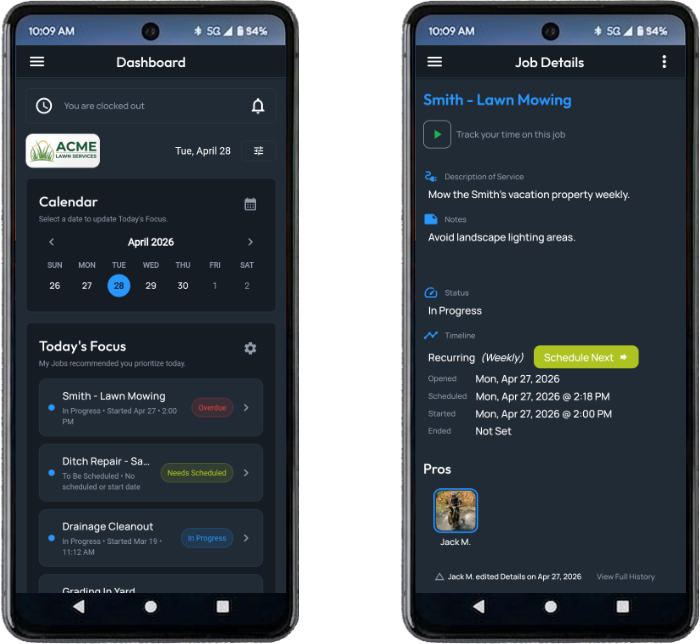
- To provide a better tool for helping you stay organized, the Today’s Schedule tile on the Dashboard was renamed to Today’s Focus. It prioritizes jobs you’re assigned to and indicates their severity based on scheduled times, start times, status, and timeline type.
- Jobs are now labeled to show why they’re on the focus list.
- You can hide or show certain categories using the settings button.
- The Calendar is now tied to Today’s Focus. Select a day on the calendar to see an updated list of jobs for that day based on current jobs data.
The most notable improvement in version 3.2.0 is the ability to change a job’s timeline type to Recurring. This is especially beneficial for landscapers, dog walkers, cleaning services, or any other type of business that has regularly scheduled, repeating jobs for the same customer.
When creating or editing a job, set the Timeline to “Recurring”, then set the Frequency at which you’ll do the job:
- Daily,
- Weekly,
- Bi-weekly, or
- Monthly
This manipulates the Scheduled date/time. When you bump the schedule using the Schedule Next button, it updates the Scheduled date so you know when the job needs to be revisited.
Other changes:
- Jobs can now be scheduled, started, and completed at specific times, not just days.
- Job Reports and table exports were reformatted to include new information.
- If an update is available, you can manually trigger it from the Settings & Help page.
- Search security was enhanced to keep your resources isolated.
- Backend notification services were updated to a more reliable partner.
- Other backend functionality was updated.
- Fixed an issue when new businesses setup their timesheet preferences.
- Crash reports and other bugs were addressed.
If you run into issues with this release, please let us know here so we can fix it.